Most Apple Watch round-ups assume you want the same things the marketing pages assume: rings to share, friends to compete with, streaks to defend in public. For a lot of people, that framing is the point. For others, it's the reason they put the watch in a drawer. This list is the one that's left when you peel the social layer off.
A wrist that doesn't ask anything of anyone else.
Why introverts need a different list
Apple's defaults push competition. The Activity app suggests contacts to share rings with. The Fitness+ section nudges towards group workouts. Many of the popular wellness apps require a friend graph before their main features unlock, or they make leaderboards the headline feature on the home screen. For an introvert, this isn't motivating. It's a small, constant background hum of being watched.
The good news is that the Apple Watch itself works fine without any of it. Steps still count. Workouts still log. Pets still eat. The trick is finding apps where the solo experience is the primary path, not a tolerated side door. That's what this list is.
What “introvert-friendly” actually means here
Not every app that lacks a chat feature counts. The bar for this list is:
- No friend graph required. You don't have to add a contact, follow anyone, or accept a request to use the core loop.
- No public leaderboards. Your score, streak, or step count isn't ranked against strangers or contacts.
- No public profile. You aren't represented in the app by a name, avatar, or stat sheet that other users can view.
- No shared-streak pressure. The streak is yours. Nobody else's app updates because of yours.
- Social features are skippable, not central. If a social layer exists, it's a side menu, not the home screen.
The list: solo Apple Watch games and apps
1. Belly — cute pet on your watch
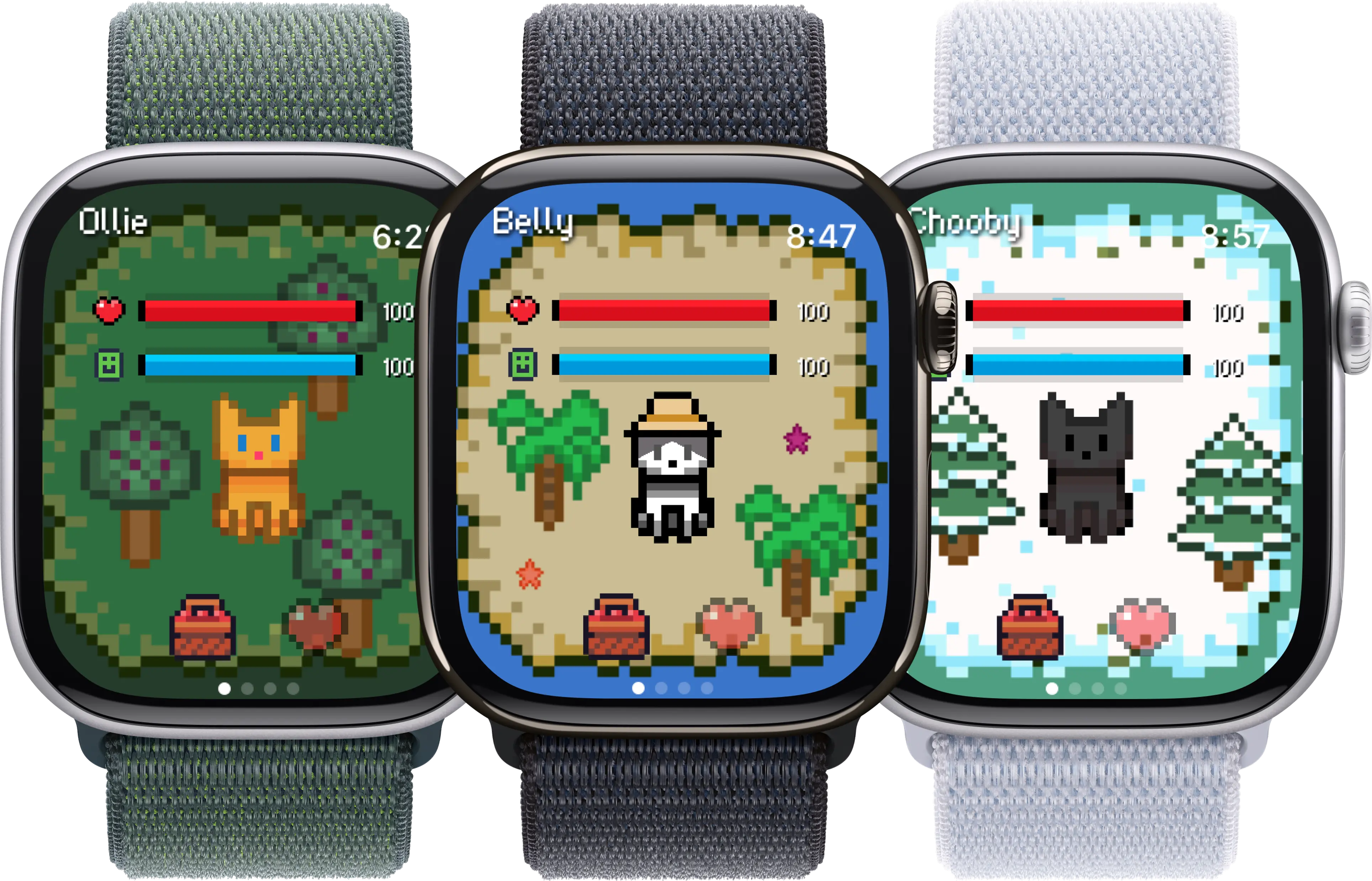
A small pixel pet that lives on the Apple Watch face and reacts to your steps and movement. No friend graph, no leaderboards, no profile to fill out. You tap to feed, you walk, the pet is happy. That's the whole loop.
Social footprint:
- Leaderboards: none
- Friend graph: none
- Social sharing: none required
- Public profile: none
Honest catch: Belly is new and still growing. The pet roster and mini-interactions are smaller than long-established Tamagotchi-style apps.
2. Apple Mindfulness
Apple's built-in breathing and reflect sessions. Entirely solo. The watch nudges you to take a minute, you breathe, the session ends. Nothing is posted, no streak is shown to anyone else.
Social footprint:
- Leaderboards: none
- Friend graph: none
- Social sharing: none
- Public profile: none
Honest catch: It's minimal by design. If you want narrative or characters, this won't scratch that itch. It's a breathing timer with good haptics.
3. Streaks
A habit tracker built around up to twelve daily habits. The streak count is yours alone. There is no community feed, no follow button, no shared challenges. Apple Watch complications keep the current state on the wrist.
Social footprint:
- Leaderboards: none
- Friend graph: none
- Social sharing: optional export only
- Public profile: none
Honest catch: The streak format itself can feel like pressure to some people. If a broken streak ruins your week, this app may not be the right shape for you, even though no one else sees it.
4. Habbie
Another virtual pet on the Apple Watch, with a habit-tracking layer. Mostly solo by default. You raise your pet through small daily actions. There are gentle social touches in the wider app, but the core loop runs without them.
Social footprint:
- Leaderboards: none in the core loop
- Friend graph: optional, can be skipped
- Social sharing: optional
- Public profile: optional
Honest catch: A few features nudge towards community elements. They are skippable, but worth knowing they exist if you want a fully private experience.
5. Pocket Bandit
A single-player safe-cracking game made for the Apple Watch's Digital Crown. You rotate the crown to feel for the click. It's a short, tactile, solo puzzle. No accounts, no friends, no high-score boards on the watch face.
Social footprint:
- Leaderboards: none on the watch
- Friend graph: none
- Social sharing: none required
- Public profile: none
Honest catch: Short replay loop. Once you've cracked a safe, the novelty per session is low. Good for a quiet minute, not for hours.
6. Solitaire (classic, watch versions)
Several Solitaire apps offer Apple Watch versions of Klondike or simple card draw. By nature this is a single-player game. Pick a version without an account requirement and you have a true solo experience.
Social footprint:
- Leaderboards: varies by app, often skippable
- Friend graph: none
- Social sharing: optional
- Public profile: optional
Honest catch: Some Solitaire apps push ads or in-app purchases hard. The game itself is solo, but the wrapping around it isn't always quiet. Choose the app carefully.
7. Watch Pet
An older pixel-pet app on the Apple Watch. Solo by default. You take care of a small creature through small interactions and your own movement. No friend-graph requirement.
Social footprint:
- Leaderboards: none
- Friend graph: none
- Social sharing: none required
- Public profile: none
Honest catch: Updates have slowed in recent years. It still works, but it doesn't get new features at the pace of newer pet apps.
8. Apple Workout
Apple's built-in workout app is solo by default. The Activity sharing layer (the rings you can share with friends) is opt-in. If you never invite anyone, no one sees your rings. The workouts themselves don't require any social setup.
Social footprint:
- Leaderboards: only if you opt in to Activity sharing
- Friend graph: only if you invite people
- Social sharing: opt-in
- Public profile: none
Honest catch: The defaults nudge you towards sharing. Notifications suggest inviting contacts. You can shut all of this off (see the section below), but it takes a minute to find the toggles.
Updated May 2026. App features change with updates. If a quiet app suddenly adds a leaderboard, the toggle to hide it is usually in settings; if not, that's a sign the app's direction has shifted.
Why Belly fits this list
We didn't build Belly as an “introvert app.” We built it because we wanted a small pet on the watch that didn't turn into a social platform. No leaderboards. No friend graph. No public profile. You don't sign up. You don't follow anyone. The pet reacts to your steps and to your taps, and that's the whole interaction. If a friend also has Belly, that's nice; it doesn't change anything in your app.
That made the design easier in some places (no servers tracking friend graphs) and harder in others (no easy growth loop via invites). It also means the app stays the same shape when you're the only one using it, which is the whole point for this audience. If you want more on this design choice, the virtual pet round-up and the anxiety-friendly games piece cover the adjacent ground.
Apple Watch defaults to tweak
Even with quiet apps installed, Apple's own defaults can leak social pressure into your wrist. A few minutes in Settings goes a long way:
- Turn off Activity sharing. On iPhone, open the Fitness app, tap Sharing, and remove anyone you don't want to share with. If you've never added anyone, this is already done.
- Silence the suggestions. Apple sometimes prompts you to invite contacts to share rings. In the Fitness app's notification settings, you can disable suggestion-style alerts and keep only the workout and goal notifications you actually want.
- Mute competition invites. If anyone has ever invited you to a seven-day competition, the prompt can keep coming back. Decline once and turn off competition notifications in the Fitness app.
- Hide rings from the watch face. If the rings themselves feel like pressure (not the sharing, the rings), a different watch face complication can replace them. The workout still logs in the background.
- Audit notification settings on every fitness app. Some apps default to weekly recap notifications that compare you to other users. Disable any notification that uses words like “rank,” “leaderboard,” or “your group.”
After this pass, the watch becomes a tool that reports to you and only you. The apps on this list slot into that shape naturally.
On the introvert framing itself
A small disclaimer: being an introvert isn't a condition. It's a preference for environments with less social load, more time alone to recharge, and lower-stimulation surroundings. It doesn't need an app to “fix” it. The point of this list isn't to manage introversion. It's to choose tools that don't add unnecessary social weight in the first place.
A leaderboard isn't bad. A shared streak isn't bad. If those features make you feel connected and motivated, use them. This list is for the moments when you'd rather not. Both can be true at once: a social walking challenge on Saturdays, and a quiet pet on the wrist for the rest of the week.
Frequently asked questions
Why does this list even exist? Aren't most apps already solo?
On the surface, yes. Most Apple Watch apps work fine without friends. But the defaults tell a different story. Apple's Activity app actively suggests inviting people. Many wellness and fitness apps gate features behind a friend graph or push leaderboards as a core loop. For someone who finds social comparison stressful, the wrist quickly fills with low-grade pressure. This list collects apps that are solo by default, not just solo by tolerance.
Is being an introvert a reason to avoid social fitness apps?
Not necessarily. Plenty of introverts enjoy fitness leaderboards with close friends, and plenty of extroverts find them exhausting. Introversion isn't a problem to fix. It's a preference for lower-stimulation environments and smaller social loads. If a leaderboard energizes you, keep it. If it drains you, swap it out. This list is for the second group, without claiming the first group is wrong.
Can I use Apple's Activity rings without sharing them with anyone?
Yes. Activity sharing is opt-in. Open the Fitness app on iPhone, go to Sharing, and remove or never add contacts. The rings themselves are private until you choose otherwise. You can also silence the suggestion prompts and notification reminders. The rings then become a personal dashboard, no different from any other app on the watch.
Related reading: If you want the wider cozy-games view, the cozy Apple Watch games guide covers nearby ground. For an anxiety-aware angle, see Apple Watch games for anxiety. And for the broader pet category, the Apple Watch pet games piece is the place to start.