Most Apple Watch apps are an afterthought to an iPhone app. The ones below are not: each has a real watch app, does something useful from the wrist, and is still being updated for watchOS 27. We checked every app's App Store listing and price in October 2026, and we say where you need a subscription and where you do not.
At a glance
| App | Price | Best for |
|---|---|---|
| Apple Sleep, Vitals and Training Load | Free (built in) | Health basics with nothing to install |
| AutoSleep | $9.99 one-time | Sleep tracking without a subscription |
| Athlytic | Free, Pro $29.99/year | A daily recovery score |
| Gentler Streak | Free, Premium $39.99/year | Staying active without burning out |
| Headspace | Free download, $69.99/year | Meditation and breathing on the wrist |
| Strava | Free, subscription $79.99/year | Runners and cyclists |
| Belly | Free, optional cosmetics | Making walking fun |
| Nike Training Club | Free, no in-app purchases | Free guided workouts |
| Fantastical | Free, Premium $56.99/year | Your calendar at a glance |
| Things 3 | $9.99 one-time (watch app included) | To-do lists without a subscription |
| Todoist | Free, Pro $59.99/year | A free to-do app that works everywhere |
| Streaks | $5.99 one-time | Building daily habits |
| Carrot Weather | Free, Premium $19.99/year | People who check the weather a lot |
| Overcast | Free, optional Premium | Podcasts without your phone |
| Spotify | Free, Premium needed for downloads | Music on a run |
Health and sleep
The watch is a health sensor first. These apps turn what it measures into something you can act on.
1. Apple Sleep, Vitals and Training Load
Start here before installing anything. Since watchOS 26, the Sleep app gives each night a Sleep Score out of 100, built from how long you slept, how consistent your bedtime was and how often you woke up. The Vitals app checks your overnight heart rate, breathing rate, wrist temperature and blood oxygen, and alerts you when several readings fall outside your usual range. Training Load, inside the Activity app, compares your last 7 days of workouts with the 28 days before, so you can see when you are ramping up too fast.
The catch: Apple shows you the numbers but does not coach you much. For a daily readiness score or advice on what to do next, see Athlytic and Gentler Streak below.
2. AutoSleep
AutoSleep tracks sleep on its own: wear the watch to bed and the report is waiting in the morning, with no button to press. The watch app adds a smart alarm and 11 complications, so last night's sleep can sit on your watch face. It is a one-time purchase with no extra in-app purchases, which is rare for a sleep app in 2026.
The catch: The iPhone app shows a lot of rings and numbers at once. It takes a few days to learn which ones matter to you.
3. Athlytic
Athlytic turns your watch's heart data into three numbers: Recovery, Exertion and Energy Battery. It is the same idea as a WHOOP band, without the extra hardware. All three work as complications (16 in total), and during a workout the watch shows your live heart-rate zones.
The catch: The useful parts are in Pro. The free version is mostly a trial.
4. Gentler Streak
Gentler Streak suggests how hard to work out each day based on your recent effort, and you can scale the suggestion up or down from the watch. Apple named it Apple Watch App of the Year in 2022. It suits anyone who finds closing all three rings every day more stressful than motivating.
The catch: The coaching is gentle by design. If you train for races, you will want something more structured.
5. Headspace
Headspace relaunched its watch app in May 2026. It plays meditations, sleepcasts and breathing exercises straight from the watch, and can nudge you to take a break when your heart-rate variability suggests you are stressed. It needs watchOS 26.1 or later.
The catch: Almost everything sits behind the subscription. For simple breathing exercises, try the free Mindfulness app that comes on the watch first.
Fitness and walking
Apple's Workout app covers the basics. These add what it is missing, and one makes walking more fun.
6. Strava
Strava records runs, rides and walks on the watch without your iPhone. Since September 2025, subscribers also get Live Segments on the wrist, which show in real time whether you are ahead of or behind your best time on a stretch of road.
The catch: Route planning, leaderboards and most of the training analysis need the subscription.
7. Belly
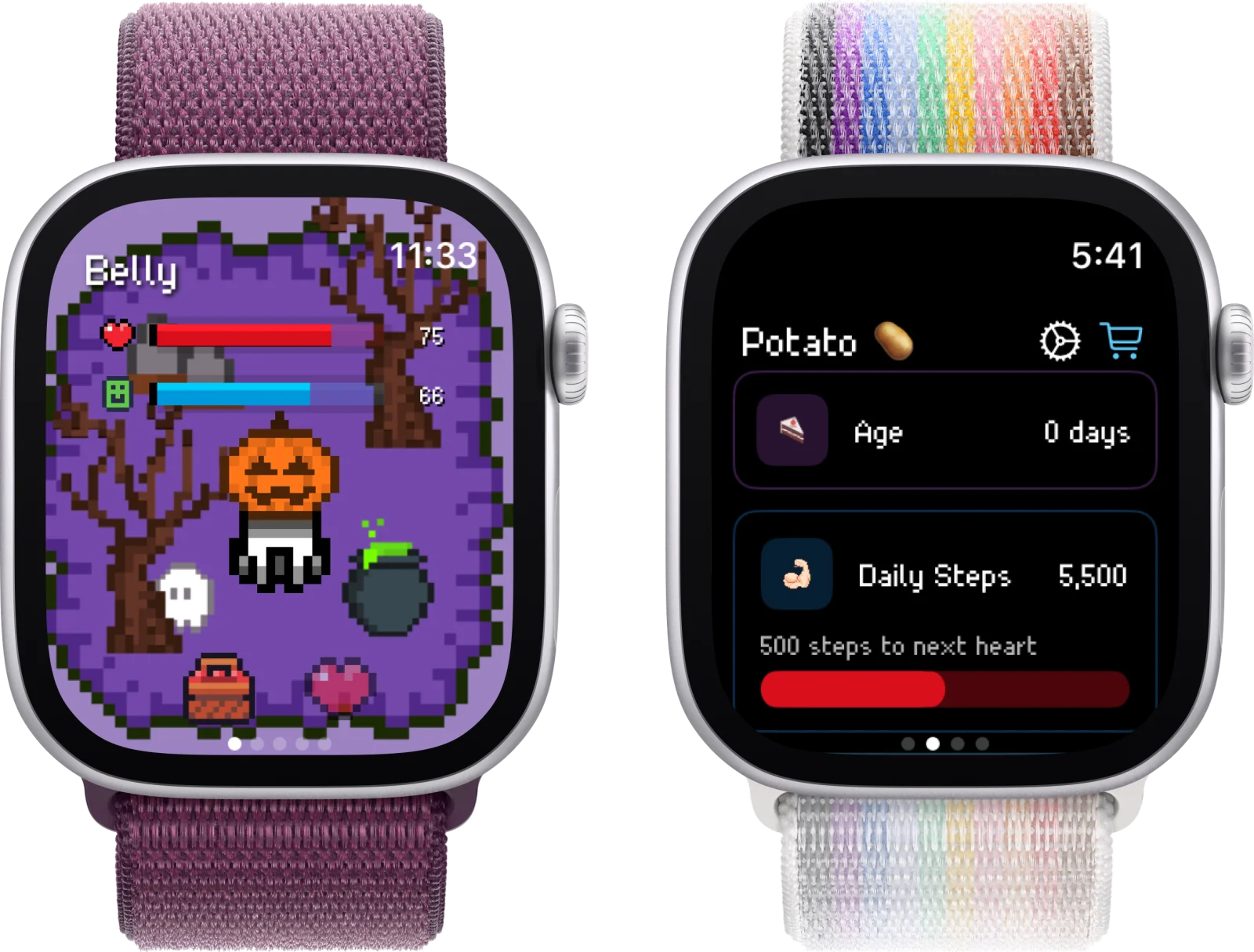
Belly puts a pixel cat on your watch that you feed, play with and look after. It reads your step count from Apple Health, so walking more keeps your pet happier. It runs on the watch on its own, and its complications let the cat live on your watch face. Pet care is free; the optional premium only adds cosmetics.
The catch: It is a game, not a fitness tracker. For workout data, pair it with Strava or Apple's own apps.
8. Nike Training Club
Nike Training Club is still fully free, with no in-app purchases. Start a workout and the watch shows each move with your live heart rate and calories. You can skip, pause or jump to the next exercise from your wrist.
The catch: The exercise demonstrations are on the phone. The watch is for control and stats.
Productivity
The best productivity apps on the watch do one thing: show you what is next, and let you add something in two seconds.
9. Fantastical
Fantastical's watch app opens on Up Next, your next events with the weather alongside, and adds a tasks view and 8 complications. You can dictate a new event in plain language. Its App Store listing says the watch app also works over LTE when the phone is not nearby.
The catch: Many features need Premium, and at $56.99 a year it is one of the pricier apps on this list.
10. Things 3
Things shows your Today list on the watch. Check items off, or dictate a new to-do. The iPhone purchase includes the watch app, and it was updated for watchOS 27.
The catch: The Mac app is a separate purchase, and there is no free tier to try first.
11. Todoist
Dictate a task with a plain-language date, like "call the dentist Friday at 10", and Todoist files it with the date set. Complications show how many tasks are left today. The free tier covers most personal use.
The catch: The watch app needs your iPhone in range.
12. Streaks
Streaks tracks daily habits, which you tick off from the watch. It supports every complication type and recently added Undo on the watch for accidental taps. Habits tied to Apple Health, like a step goal, can complete on their own.
The catch: It only tracks habits. There are no notes or journaling.
Everyday tools
Weather, podcasts and music: the apps you open most without thinking about it.
13. Carrot Weather
Carrot pulls forecasts from sources like Apple Weather, AccuWeather, Foreca and The Weather Channel, and lets you choose which one to trust. On the watch you pick exactly which data points show, check weather maps and follow incoming rain as a Live Activity. The forecasts come with optional jokes from a sarcastic robot.
The catch: Complications need Premium, and some features need the pricier Ultra tier.
14. Overcast
Overcast can download episodes to the watch or stream them over cellular, so you can leave the phone at home on a run. Downloaded episodes keep Smart Speed, which trims silences, and Voice Boost, which evens out the volume. The watch app was rewritten in 2025.
The catch: Streaming over cellular needs a cellular Apple Watch and a plan for it.
15. Spotify
With Premium, Spotify lets you download at least 10 hours of music and podcasts to the watch, or stream over cellular or Wi-Fi with the phone left at home. It needs an Apple Watch Series 4 or later on watchOS 10 or later.
The catch: On a free account, the watch app is only a remote for your phone.
Also worth installing
- Shazam: Free. The watch version is now a separate app, Shazam Music Recognition (watchOS 11 or later), and can listen for music automatically.
- 1Password: $47.99/year. Shows only the items you choose to add to the watch, such as cards and one-time codes, and a code can sit on your watch face.
- WorkOutDoors: $8.99. Maps you can store on the watch for hiking and trail running with no signal.
- Just Press Record: $6.99. Record voice notes from a complication with no iPhone nearby; they sync later.
- WaterMinder: Free, Premium from $14.99/year. A standalone watch app for logging a drink in one tap.
The best free Apple Watch apps
If you would rather not pay for anything, this set covers a lot: Apple's own Sleep, Vitals and Training Load for health, Nike Training Club for workouts, Strava's free tier for recording runs, Todoist for tasks, Shazam for music, and Belly for something fun. For more, see our list of free Apple Watch apps with no subscription.
How we picked
Every app here has a real watch app, confirmed on its App Store listing in October 2026. We left out apps whose watch version is only a remote for the phone. Spotify stays because Premium works without the phone; on a free account it is only a remote, and we say so. Prices are US App Store prices as listed and can change.
If you are setting up a new watch, our guides to the best complications and how to get games on Apple Watch cover the next steps.