The Series 10 brings the biggest non-Ultra screen Apple has shipped, a faster S10 chip, and a wider-angle OLED panel. None of those things change what games exist for Watch, but they do change which games feel comfortable to play. Here are the ones that actually take advantage of what Series 10 owners get.
Why the Series 10 is good for games
- Wider display. Series 10 fits a 46mm case with a larger usable area than Series 9, which helps games that show grids, lists, or sprites.
- S10 chip. Faster app launches, smoother animations, and on-device Siri for voice-driven games.
- Always-on display at 1Hz. Game complications stay readable when your wrist is down.
- Wide-angle OLED. Off-axis viewing is much better than prior generations, useful for showing your pet to a friend.
- 18-hour battery. Same as prior Series. If you game a lot mid-day, the battery is the limit, not the chip.
Top games for Apple Watch Series 10
1. Belly: Cute Virtual Watch Pet
Free virtual pet, watch-only, hand-drawn cosmetics.
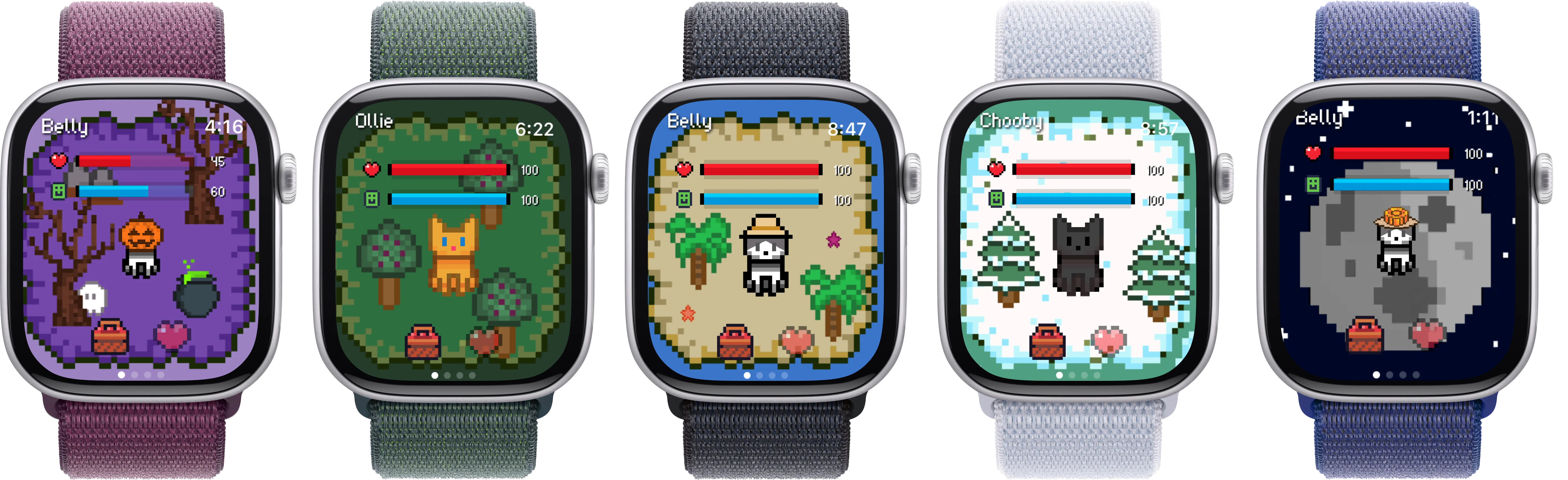
Series 10's wider edge-to-edge display gives the pet sprite more room and the always-on display keeps a complication of pet status visible without raising your wrist. Hand-drawn cosmetics look noticeably crisper on the wider 1Hz AOD panel.
View on App Store →2. Habbie
Steps-driven pixel pet.
Pixel art benefits from Series 10's larger usable display area. AOD support means the pet stays glanceable.
3. Pocket Bandit
Crack a safe by feel using the Digital Crown and haptics.
The S10 chip handles haptic feedback fluidly. The wider screen gives the dial more room to breathe.
4. Rules!
Puzzle game with rotating rule sets.
Faster taps register cleanly on Series 10. The bigger display means fewer mis-taps under timed pressure.
5. Trivia Crack
Quick-fire trivia in six categories.
Multiple-choice answers fit better on the Series 10 panel without truncating long category names.
6. Tiny Armies
Wrist-sized strategy battles.
Battle units render larger on the 46mm Series 10 than on prior generations.
7. Letterpad
Word puzzle on a 4x4 grid.
The grid scales nicely with the Series 10's display gain over Series 9 (around 9% more usable area).
Belly on Apple Watch Series 10
Series 10 is currently the most enjoyable place to play Belly outside of the Ultra. The wider display gives the pet sprite, scenes, and cosmetics more space without the size or price of an Ultra. The wide-angle OLED makes the hand-drawn art look as intended even when you tilt your wrist to show someone else.
The always-on display matters more for Belly than it does for most apps. Belly's three complication families (rectangular, circular, corner) all show pet status live, so when your wrist is down the watch face still shows hearts, hunger, or coin counts depending on which complication slot you use. On Series 10, those complications stay sharp on AOD instead of dimming to an unreadable smear.
Performance-wise, the S10 chip launches the app fast enough that the loop of "raise wrist, glance at pet, dismiss" feels instantaneous. There is no Series 10-only feature in Belly itself: the customization library, social features, and language support are the same on every supported Watch.