The Ultra and Ultra 2 share a chip generation with the matching Series Watch, so games do not run faster on Ultra. What you do get is the largest screen on any Apple Watch, the brightest panel, and roughly double the battery. Those three things make a real difference for games you actually want to play for more than 30 seconds at a time.
Why the Ultra is good for games
- 49mm display. Sprites, UI, and text are all larger than on a 41mm or 46mm Series. Easier on the eyes for longer sessions.
- 3000-nit brightness. Visible in direct sunlight, so you can actually play during a hike or outdoor break.
- 36-hour battery (72 in low power). Frequent gaming on a Series Watch eats into the daily charge. On Ultra, it almost never matters.
- Action button. Map a Shortcut to it and you have a one-press launcher for your favourite game.
- Always-on Retina display. Pet status and similar complications stay readable when your wrist is down.
Top games for Apple Watch Ultra
1. Belly: Cute Virtual Watch Pet
Free virtual pet, watch-only, hand-drawn cosmetics.
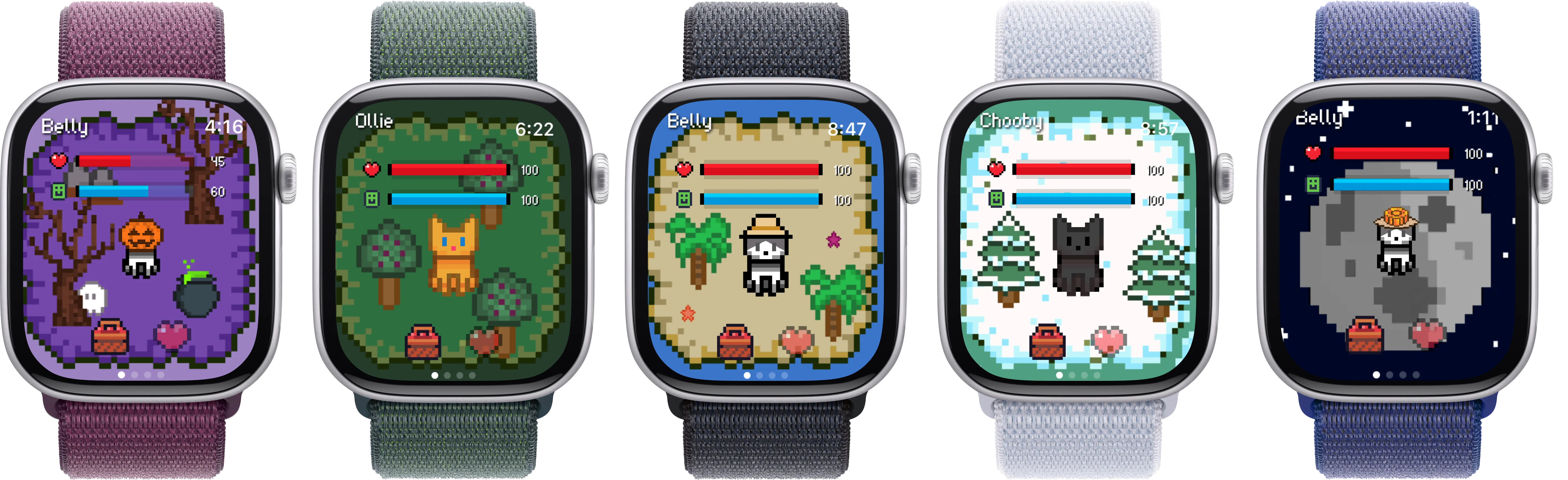
The 49mm screen makes the pet sprite noticeably larger and more readable. Outdoor activity (hikes, long runs, multi-day trips) maps directly to coins and hearts, so Ultra owners who actually use the battery for what it was made for tend to progress faster than 41mm Series owners.
View on App Store →2. Habbie
Steps-driven pixel pet.
Pixel art renders sharply on the Ultra panel. Long battery means you can leave it on watch-only mode without nightly charging.
3. Pocket Bandit
Crack a safe by feel using the Digital Crown and haptics.
The Ultra's haptic engine is the same as standard Series, but the larger display gives more room for the dial UI and the action button can open it via a Shortcut.
4. Rules!
Puzzle game with rotating rule sets.
Bigger tap targets on the 49mm display reduce mis-taps. Good for outdoor sessions with gloves off.
5. Trivia Crack
Quick-fire trivia in six categories.
Readable on the brighter (3000 nit) Ultra display in direct sunlight, useful for trail breaks.
6. Tiny Armies
Wrist-sized strategy battles.
Larger units on the Ultra screen, comfortable for short campaigns between activity blocks.
7. Letterpad
Word puzzle on a 4x4 grid.
The grid scales up on Ultra, helpful if you find smaller Watch displays cramped.
Belly on Apple Watch Ultra
Belly is built for the Watch and scales to whichever model you wear. On Ultra, you get the deepest version of the same experience: a larger pet, larger hand-drawn cosmetics, more readable hearts and coin counts, and a wider canvas for scenes and backgrounds. None of these are Ultra-exclusive features. They are just bigger because the screen is bigger.
Where the Ultra does change the experience is battery and outdoor use. Belly progresses with steps. The kind of person who buys an Ultra (hikers, long-distance runners, divers, outdoor workers) tends to walk a lot more on a typical day than someone who pairs a 41mm Series with a desk job. Belly rewards that, without you doing anything different.
The complication families (rectangular, circular, corner) all show pet status live, so you can keep an eye on hearts and coins from a watch face like Wayfinder or Modular Ultra without opening the app. The Action button is also a one-press path to launching Belly via a Shortcut, which is faster than the side-button app grid.